On-Demand Lifecycle (Scale-to-Zero)
Adapters that are only used occasionally — for example an adapter that generates documents on request, or one that imports data once per night — do not need to run around the clock. With the on-demand lifecycle, OctoMesh scales such an adapter down to zero replicas after a period of inactivity and wakes it automatically as soon as it is needed again. Adapters that process live data streams keep running permanently.
The feature applies to adapters that are deployed through a Pool (Helm-managed workloads).
Lifecycle modes
Every pool-managed adapter has a LifecycleMode:
| Mode | Behavior |
|---|---|
AlwaysOn (default) | The adapter runs permanently. Nothing changes compared to previous OctoMesh versions. |
OnDemand | The adapter is scaled to zero replicas after it has been idle for longer than IdleTimeoutMinutes (default 30) and is woken automatically on demand. |
The IdleTimeoutMinutes setting defines how long the adapter may be idle — no pipeline execution — before it is put to sleep.
A third mode, Auto, is reserved in the data model for a future version in which OctoMesh derives the mode from the adapter's pipeline triggers. It is not functional yet and is rejected by the platform — use AlwaysOn or OnDemand.
Lifecycle states
The current lifecycle situation of an adapter is shown in the runtime field LifecycleState:
| State | Meaning |
|---|---|
Running | The adapter is up and processing work as usual. |
Draining | The idle timeout elapsed; the platform is scaling the adapter down to zero replicas. |
Hibernated | The adapter is scaled to zero. It consumes no cluster resources; its Helm release and configuration remain in place. |
Waking | A demand signal arrived; the adapter is being scaled back up. The state returns to Running once the adapter has re-registered and its pipeline configuration is applied. |
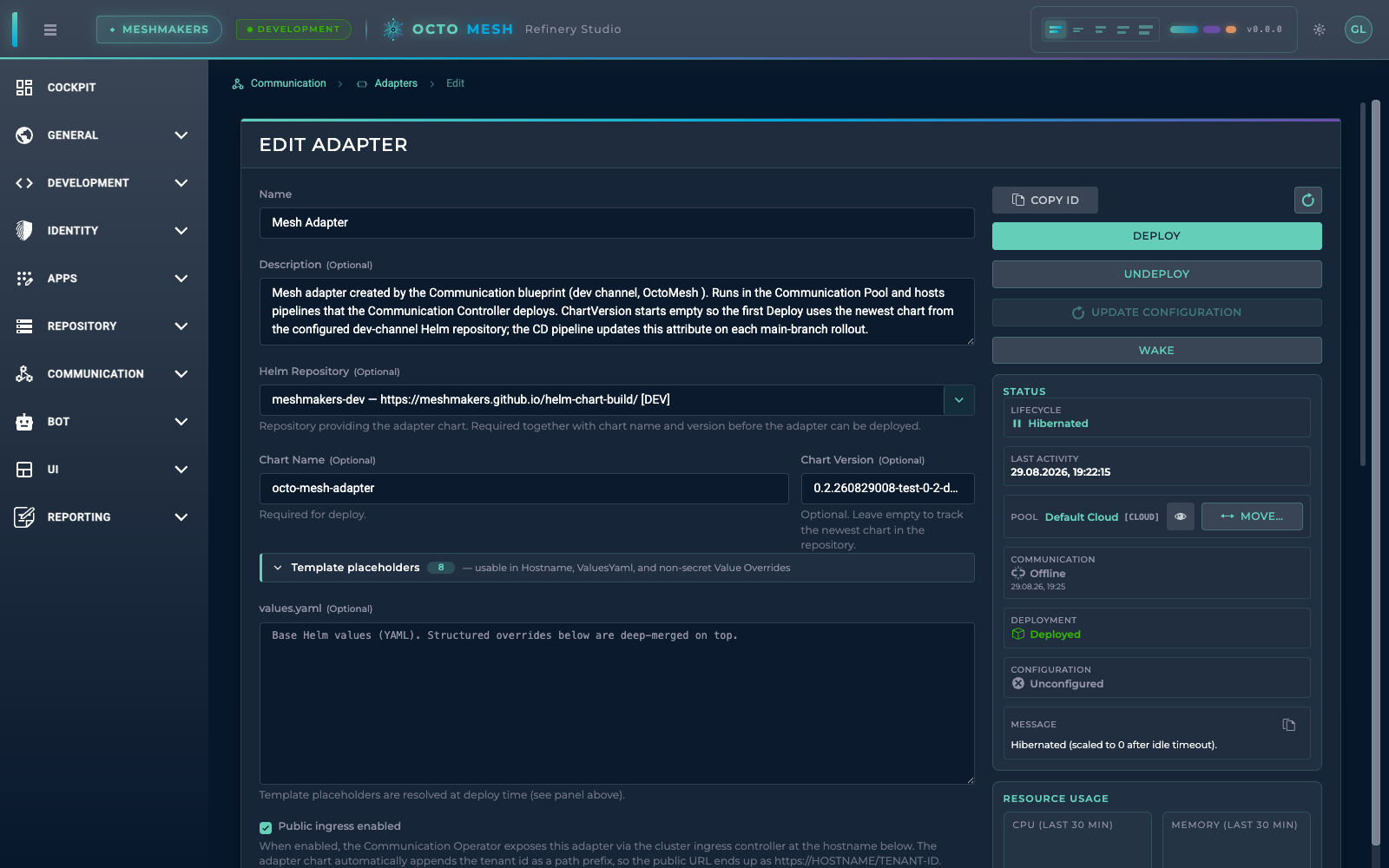
While an adapter is hibernated, DeploymentState remains Deployed (the Helm release still exists) and CommunicationState shows Offline — the adapter process is intentionally not running, so an offline communication state is normal and expected in this situation, not an outage. Always read these two fields together with LifecycleState.
Enabling scale-to-zero
Two switches must both be on before an adapter scales down:
-
Per tenant — scale-to-zero must be enabled for the tenant. This is runtime configuration; no redeployment of any service is required:
# enable for the current tenantocto-cli -c SetCommunicationLifecycle -sze true# check the current settingocto-cli -c GetCommunicationLifecycleSetting
-sze falseagain is the per-tenant emergency stop: no further adapters are hibernated, and already-hibernated adapters come back on the next demand signal (or via a manual wake). -
Per adapter — set
LifecycleModetoOnDemandand choose anIdleTimeoutMinutesin the adapter's Edit view in Refinery Studio (or via GraphQL). The default mode isAlwaysOn, so only adapters you explicitly opt in participate.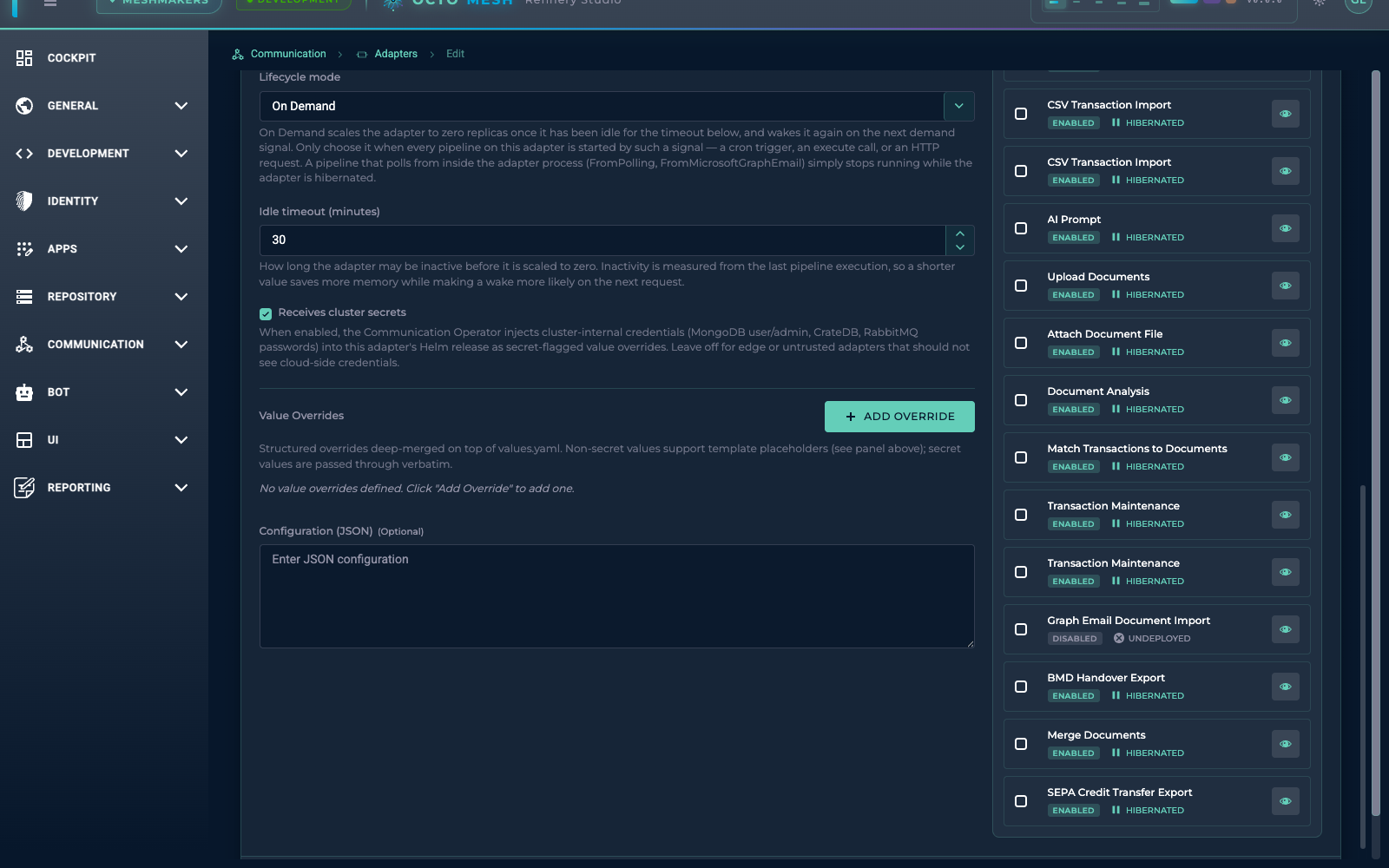
LifecycleMode and IdleTimeoutMinutes are part of the adapter's authored configuration. If the adapter entity is managed by a blueprint, re-applying the blueprint resets these fields to the values seeded by the blueprint. Either set the mode in the blueprint's seed data or re-check the adapter settings after a blueprint update.
How hibernation works
A background watchdog in the platform checks on-demand adapters periodically (every 5 minutes by default). An adapter is considered idle when no pipeline execution has happened for longer than its IdleTimeoutMinutes. An adapter is never put to sleep while:
- a pipeline execution is currently running, or
- a configuration deployment is in progress.
When the adapter is idle, the platform scales its deployment to zero replicas (Draining → Hibernated). The adapter's pipelines show as Pending while it is hibernated — this simply records that their configuration will be redelivered on the next wake-up.
How waking works
Any of the following signals wakes a hibernated adapter:
- A pipeline execution request — executing a pipeline on a hibernated adapter transparently wakes it first, then runs the pipeline.
- The Wake button in Refinery Studio — available in the adapter list's context menu and in the adapter's Edit view. The action blocks until the adapter is ready (up to the wake budget of 60 seconds) and shows progress while waking.
- The REST API —
POST {tenantId}/v1/adapter/{workloadRtId}/wakeon the communication service. Applications can call this to pre-warm an adapter before sending work. - An incoming HTTP request — if the HTTP activator is configured, a request to one of the adapter's HTTP endpoints wakes it automatically.
- A scheduled (cron) trigger — pipeline triggers wake the adapter at their scheduled time; see the next section.
Scheduled triggers and event messages are not lost during hibernation: trigger and data-event messages buffer in durable queues and are processed once the adapter is back up.
The wake itself completes when the adapter has re-registered and reports its configuration as applied. Expect a first response time of roughly 8 seconds after a wake; requests arriving through the HTTP activator can take a few seconds longer because the adapter's HTTP endpoint additionally has to pass its readiness probe.
A hibernated adapter in the Edit view — Deployed plus Offline is the expected combination, the status panel names the lifecycle state, and the Wake button starts it on demand:
HTTP activator: waking on HTTP requests
Adapters can expose HTTP endpoints through pipelines with HTTP triggers. With the workload scaled to zero, the cluster ingress would normally answer such a request with an error. The HTTP activator closes this gap: the first request to a hibernated adapter is held by the platform, the adapter is woken, and the request is then delivered — the caller just experiences a slower first response.
The activator is disabled by default and is set up by the cluster operator:
-
Enable the activator in the OctoMesh Helm chart:
services.communication.activatorEnabled: true. -
Route traffic to it by projecting two annotations onto the workload ingresses via the Communication Operator's cluster-wide ingress annotations (
operator.ingress.annotationsin the operator chart):nginx.ingress.kubernetes.io/default-backendnaming the communication service — NGINX then routes to the activator exactly when the adapter service has no ready endpoint.nginx.ingress.kubernetes.io/proxy-read-timeoutset to at least the wake budget (60 seconds) — otherwise the ingress default of 60 seconds can cut the held request short.
Enabling the chart flag without the annotations has no effect, and vice versa.
Behavior:
- The request is held while the adapter wakes and is then forwarded. Request bodies up to 32 MB are buffered and safely redelivered, so uploads survive the wake.
- If the adapter does not become ready within the wake budget, the caller receives
503 Service Unavailablewith aRetry-Afterheader — retrying after that interval succeeds once the adapter is up. - The activator only springs into action when the adapter is unreachable; steady-state traffic goes directly to the adapter as before.
Limitations
Pipelines whose triggers run inside the adapter process — for example FromPolling or FromMicrosoftGraphEmail — stop working at zero replicas: there is no external signal that could wake the adapter, so their background work silently stops. Do not set LifecycleMode=OnDemand on adapters that host such pipelines. Migrate those pipelines to scheduled Pipeline Triggers first, or keep the adapter AlwaysOn. A validation that rejects the on-demand mode for such adapters is planned.
Safe with on-demand adapters:
- Scheduled (cron) triggers — the schedule fires in the platform, wakes the adapter, and the trigger message is delivered from a durable queue.
- Queue-based pipelines (execute commands, pipeline data events) — messages buffer durably during hibernation and are processed after the wake.
- HTTP-triggered pipelines — with the HTTP activator configured, or by waking the adapter first via the wake API.
Keep in mind that every wake adds latency to the first request (about 8 seconds). For adapters that must respond instantly at all times, keep AlwaysOn.
Pipeline debugging and hibernation
Debug mode gets no special lifecycle treatment — the interplay follows from the idle rules:
- An active debug session keeps the adapter awake. A pipeline execution paused at a breakpoint still counts as a running execution, and running executions block hibernation. The flip side: a forgotten breakpoint keeps the adapter — and its debug capture buffers — up indefinitely, defeating the scale-to-zero savings.
- Armed debugging does not prevent hibernation. A pipeline with debugging enabled but no execution in flight is idle like any other; the adapter hibernates normally. On the next wake the configuration redelivery re-arms the debug mode, so breakpoints are live again for new executions — but anything held only in the adapter's memory does not survive the scale-down: captured node data you have not fetched yet is gone, and an open debug session in Refinery Studio loses its connection.
For focused debugging work, keep the adapter AlwaysOn or raise its idle timeout for the duration, and finish (or detach) debug sessions before letting the adapter go back to sleep.
Observability
Refinery Studio shows the lifecycle state wherever the adapter appears:
- the adapter list and the adapter Edit view show
Hibernated,Draining, andWakingexplicitly (a healthyRunningadapter shows no extra icon), together with the last-activity timestamp for on-demand adapters; - the DataFlow list marks data flows of a hibernated adapter with a pause icon — their pipelines showing
Pendingduring hibernation is the normal redelivery bookkeeping, not an error.
For monitoring and alerting, the platform emits metrics and events:
| Signal | Meaning |
|---|---|
octo.workload.wake.count | Number of wakes, tagged with the outcome (configured / timeout). |
octo.workload.wake.duration | Time from the wake request until the adapter was configured and ready. |
octo.workload.hibernation.count | Number of completed hibernations. |
octo.workload.hibernated | Gauge: 1 while the adapter is hibernated or draining, 0 while running. |
octo.workload.offline_unexpected (event) | The adapter went offline without the lifecycle explaining it — this is the signal to alert on. A hibernated adapter never raises it. |